Left and right on line boundaries
With interdomain line boundaries and with normal flux-specified line boundaries, it is important to specify boundaries to the left and/or to the right of the line boundary. To explain what this means, refer to the following figure.
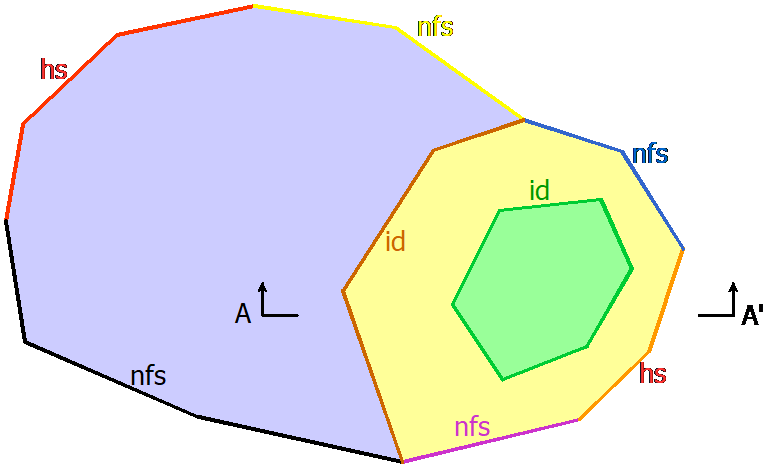
Assume that north is up and south is down in this map-view plot of an Anaqsim model. The different colored areas represent different subdomains, which are bounded by various line boundaries.
The walking convention
Consider the red interdomain line boundary (id) that separates the blue and yellow subdomains. If the coordinates for this line boundary are in order from south to north, then the blue subdomain would be to the left and the yellow subdomain would be to the right. Think of it as though you were walking along the line boundary from the first vertex towards the last vertex in the coordinates. The "left" side is to your left as you walk along the boundary and the "right" side is to the right. Alternatively, if the coordinates of this interdomain boundary are listed in order from north to south, then the yellow domain is to the left and the blue domain is to the right.
Clockwise vs counter-clockwise
Now consider the green interdomain boundary separating the green and yellow subdomains. If the coordinates of that boundary are specified in clockwise order, the yellow domain is to the left and the green domain is to the right. Alternatively, if the coordinates of that boundary are specified in counter-clockwise order, the green domain is to the left and the yellow domain is to the right.
Normal flux-specified boundaries
When a normal flux-specified boundary is external or with a head-dependent normal flux boundary, the vertex coordinates must be specified in counter-clockwise order, with the domain to the left of the boundary as you proceed along it. Consider the purple normal flux-specified boundary (nfs) in the figure. Its coordinates must be specified in counter-clockwise order (west to east) with the yellow domain to the left. Likewise, for the blue normal flux-specified boundary, the coordinates must be specified counter-clockwise from southeast to northwest, keeping the yellow domain to the left. The normal flux is positive for flow across the boundary from left to right as you proceed from the start toward the end (flow out of subdomain). Normal flux is negative for flow from right to left as you proceed from the start toward the end (flow into subdomain).