Billing & plan
From the dashboard, choose Workspace settings → Billing & plan. This page shows the selected workspace’s subscription, credits, storage, and past charges.
Current plan
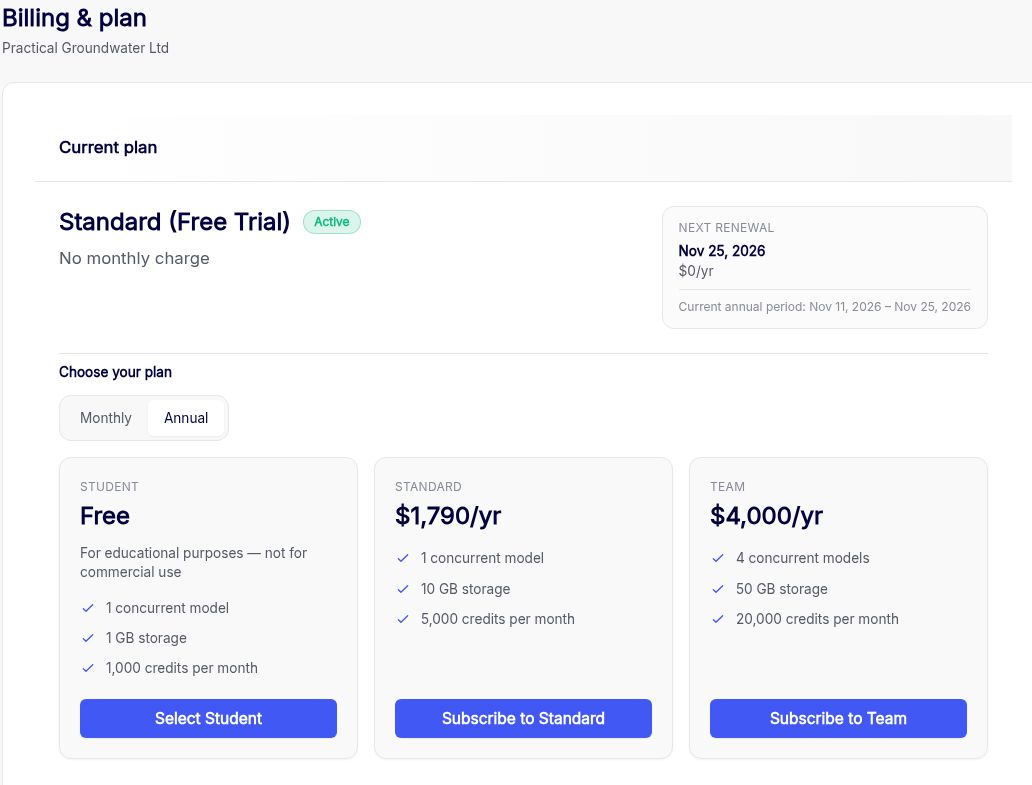
Check the current plan, status, and billing dates. The controls shown depend on how your workspace is billed.
- Free trial. The current plan shows Standard (Free Trial) and the trial dates. Under Choose your plan, switch between Monthly and Annual to compare the paid options. The cards show each plan’s price, concurrent model limit, storage, and monthly credits. Select Subscribe to Standard or Subscribe to Team to continue to the subscription flow. For non-commercial educational use, choose Select Student and confirm the app’s terms.
- Card billing. Use the link under the plan name to switch between monthly and annual billing. An immediate plan change is prorated for the rest of the billing period. A scheduled change takes effect at the end of the current period.
- Managed billing. Check Contract ends and the current billing period. Contact sales@anaqsim.com to renew or change the contract.
Credits
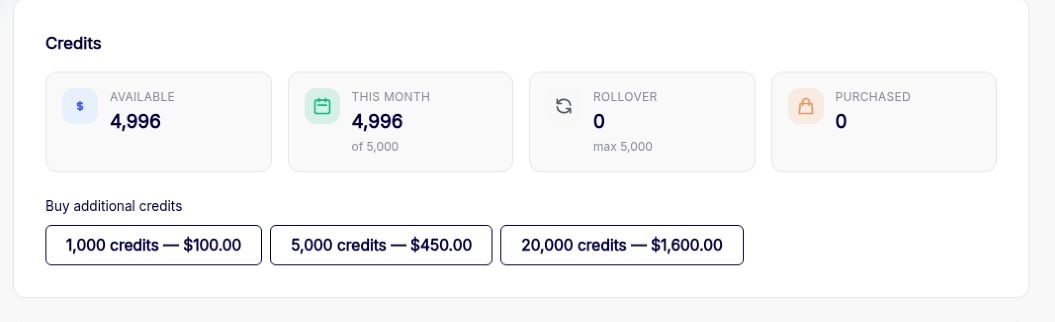
Each model solve uses credits based on its equation count and number of time steps.
Credits per solve = (number of equations)² × number of time steps ÷ 1,000,000
For example, a solve with 1,000 equations and 5 time steps uses 5 credits.
Each subscription includes a set number of credits each month. Unused monthly credits roll over to the following month and expire at the end of that month.
Anaqsim uses credits in this order:
- Rollover credits from the previous month.
- This month, the current monthly allowance.
- Purchased credits. These stay in your purchased balance until used. They do not roll over or expire.
Available is the total you can use for solves. Buy additional credits shows the available packs and prices. Open Usage to see where credits were spent.
Storage

Check the workspace storage limit and how much is included in the plan. Where available, use Add extra storage to increase the limit for a monthly charge or remove an existing add-on from the same list.
Billing history
Review invoice dates, amounts, payment status, and receipts. For managed billing, contact sales@anaqsim.com for invoice copies. Any earlier card payments shown here remain available in the history.
Delete workspace
Scroll to Delete this workspace…. Deleting the workspace permanently removes its projects and ends team access.